





















































News


 电商部
电商部  2025-12-04 10:50:53
 SATA DOM Pinout Guide: 7-Pin vs. Power Connectors Explained
A key point of confusion with SATA DOM is how it gets power, given its compact size. Understanding the pinout is crucial for selecting the right model for your motherboard.
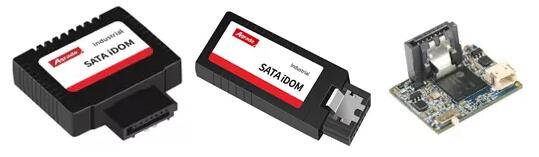
A standard SATA data connector has 7 pins, while a standard SATA power connector has 15 pins. A regular SATA SSD requires both.
The SATA DOM revolutionizes this by integrating power solutions into the data connector:
Standard 7-Pin SATA DOM: This is the most common type. It uses the standard 7-pin SATA data connector. However, for power, it relies on the host motherboard providing +5V power through a specific pin on the SATA data port (often Pin 7). This requires your motherboard header to support this feature. This elegant solution eliminates all external power cables.
SATA DOM with Additional Power Pin (e.g., Pin 8): To provide more stable power or compatibility with motherboards that don't support power-on-Pin-7, advanced designs like Innodisk's ServerDOM™ introduced an additional power pin (Pin 8). This may involve a slightly modified connector on both the DOM and the motherboard but offers a more robust and secure power delivery system.
Legacy SATA DOM with Separate Power Cable: Some older or specific SATA DOM models may still include a small, separate 2-pin or 4-pin power cable that must be connected to a power source on the motherboard.
Before You Buy:
Always check your motherboard's manual. Identify the SATA DOM header and verify which power scheme it supports (e.g., "SATADOM Power Supported"). Match this with your chosen SATA DOM's power requirements. Using a 7-pin power-through-data DOM on a motherboard without that support will result in the device not receiving power. Choosing the correct pinout compatibility ensures a smooth, cable-free installation.

-
Products
Advantages
-
Solutions
-
News
About us
-
Contact us
Tel:+86 19926658803
Whatsapp:+86 19926658803
lianle1210@163.com
Address: 30CF, Caihong Building, Caihong Road, Futian District, Shenzhen City, Guangdong Province, China



Friendly Links:
