





















































News


 电商部
电商部  2025-12-04 10:52:15
 How to Choose a SATA DOM: A Buyer's Guide for 2025
Selecting the right SATA DOM involves more than just picking a size. To ensure optimal performance and longevity for your application, consider these key technical factors.
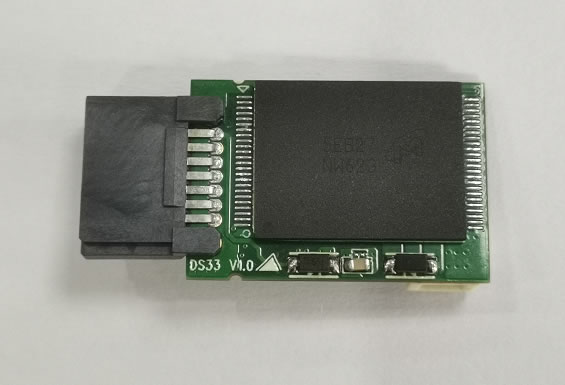
1、Capacity Needs:
SATA DOMs are not for bulk storage. Determine the minimum space needed for your operating system, application software, and logs. Common capacities are 8GB, 16GB, 32GB, 64GB, and 128GB. For a lightweight Linux OS, 8-16GB may suffice. For a Windows Embedded system with applications, 64GB or more might be necessary.
2、 Performance (Speed) Requirements:
Check the sequential read/write speeds. Performance varies by capacity and NAND type. For example, a higher-capacity DOM might offer reads up to 520 MB/s and writes around 180 MB/s, which is ample for booting and loading applications. If your application involves frequent small file writes, also consider the random write performance. Remember, SATA DOMs are optimized for read-centric tasks.
3、 Endurance and NAND Type:
This is critical for write-heavy workloads.
SLC NAND: Highest endurance, longest lifespan, best performance, but highest cost. Used in extreme industrial settings.
MLC NAND: Good balance of endurance and cost. Common in many industrial SATA DOMs.
iSLC/3D NAND: A managed type offering enhanced endurance over standard MLC at a competitive price.
Look for the warranty specification for Terabytes Written (TBW) or Drive Writes Per Day (DWPD). A DOM rated for 1 DWPD means you can write its entire capacity once per day over the warranty period.
4、Environmental Specifications:
Match the DOM's specs to your operating environment.
Temperature: Commercial grade (0°C to +70°C) or Industrial grade (-40°C to +85°C).
Shock & Vibration: Ensure it meets the standards for your field (e.g., transportation, manufacturing).
5、 Compatibility & Features:
Confirm the pinout and power method (7-pin, with/without cable) matches your motherboard. Decide if you need a hardware write-protect switch to prevent accidental data overwrites.
By analyzing your needs across these five areas, you can select a SATA DOM that delivers reliable performance for the entire lifespan of your project.

-
Products
Advantages
-
Solutions
-
News
About us
-
Contact us
Tel:+86 19926658803
Whatsapp:+86 19926658803
lianle1210@163.com
Address: 30CF, Caihong Building, Caihong Road, Futian District, Shenzhen City, Guangdong Province, China



Friendly Links:
