





















































News


 电商部
电商部  2025-12-08 12:54:24
 Installation & Maintenance Tips for Industrial Memory Modules to Extend Lifespan
Industrial memory modules—including RAM, SSDs, and flash storage—are critical components in automation systems, IoT edge devices, and mission-critical industrial infrastructure. Designed to withstand harsh environments, these modules still require proper installation and proactive maintenance to maximize their lifespan, minimize downtime, and avoid costly replacements. Unlike consumer-grade components, industrial memory operates under extreme temperatures, mechanical stress, and continuous workloads, making adherence to best practices even more essential. This guide outlines actionable installation and maintenance tips tailored to industrial settings, ensuring optimal performance and longevity for memory modules.
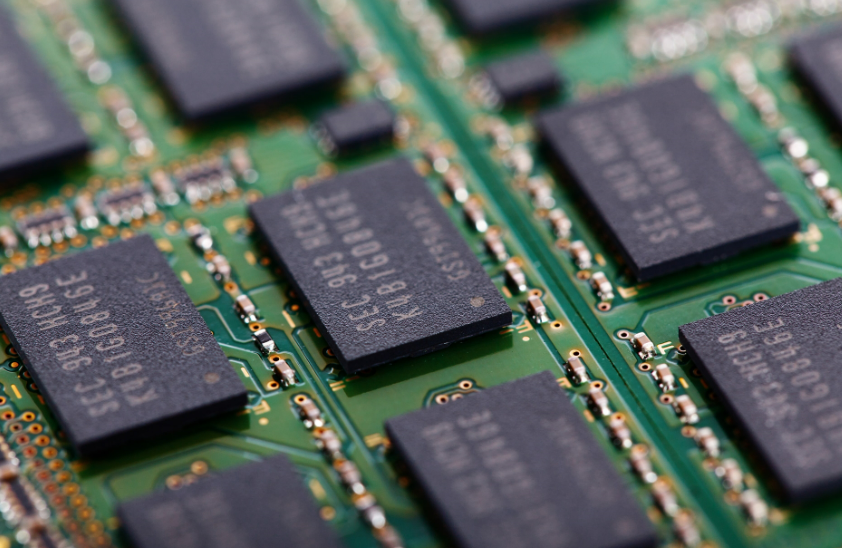
Pre-Installation Preparation: Lay the Foundation for Reliability
Before installing industrial memory modules, thorough preparation is key to preventing early failures. Start by verifying compatibility with the target system: cross-check the module’s form factor (e.g., DIMM, SO-DIMM, M.2), interface (e.g., DDR4, DDR5, SATA), and industrial specifications (temperature range, ECC support) against the motherboard or embedded system’s documentation. Using incompatible modules can cause electrical mismatches, overheating, or data corruption. Next, inspect the installation environment: ensure the system’s chassis is free of dust, debris, and moisture, as contaminants can interfere with connections or cause short circuits. For harsh industrial settings, confirm that the system has adequate cooling (e.g., fans, heat sinks) and meets the module’s environmental requirements (e.g., -40°C to 85°C operating range). Finally, gather the right tools: use anti-static wristbands or mats to prevent electrostatic discharge (ESD)—a leading cause of memory chip damage—and avoid using excessive force with screwdrivers or pliers that could bend pins or damage connectors.
Proper Installation: Avoid Common Pitfalls
Correct installation is critical to preventing mechanical stress, poor electrical contact, and premature wear. Follow these steps for secure, reliable installation:
1. ESD Protection: Always wear an anti-static wristband connected to a grounded surface, or touch a metal part of the system chassis before handling modules. Industrial memory chips are highly sensitive to static electricity, which can damage components without visible signs.
2. Align and Seat Firmly: For RAM modules, align the notch on the module with the key in the motherboard slot. Apply even pressure to both ends until the retaining clips snap into place—never force the module, as this can bend pins or crack the PCB. For SSDs or flash modules, ensure connectors are fully inserted and screws are tightened to the manufacturer’s torque specifications (typically 2–4 N·m) to avoid loose connections from vibration.
3. Cable Management: If installing modules with data or power cables (e.g., SATA SSDs), route cables away from moving parts, heat sources, and sharp edges. Avoid kinking or stretching cables, as this can damage connectors over time. Use cable ties to secure loose wires, reducing strain and preventing interference with airflow.
4. Post-Installation Verification: After installation, power on the system and run diagnostic tools (e.g., MemTest86, industrial-grade system management software) to confirm the module is detected correctly and functioning without errors. Check for firmware updates from the manufacturer—outdated firmware can cause compatibility issues or performance bottlenecks.
Routine Maintenance: Proactive Care for Longevity
Industrial memory modules require regular maintenance to withstand continuous operation and harsh conditions. Implement these practices to extend lifespan:
• Regular Cleaning: Dust buildup on modules or connectors can trap heat and cause overheating. Every 3–6 months (or more frequently in dusty environments like factories), power down the system, disconnect power sources, and use compressed air to blow dust away from memory slots and modules. Avoid using vacuum cleaners or liquid cleaners, as they can generate ESD or damage components.
• Temperature Monitoring: Use system management tools to track the operating temperature of memory modules. If temperatures exceed the module’s rated range (e.g., above 85°C), investigate cooling issues—clean fans, replace heat sinks, or improve airflow in the chassis. Overheating accelerates component degradation and reduces MTBF (Mean Time Between Failures).
• Vibration and Shock Mitigation: For modules in high-vibration settings (e.g., robotic arms, vehicle-mounted systems), inspect mounting hardware quarterly. Tighten loose screws, replace worn shock absorbers, and ensure modules are secured with industrial-grade fasteners. Consider using vibration-dampening brackets to reduce mechanical stress on connectors and PCBs.
• Firmware and Driver Updates: Manufacturers regularly release firmware updates to address stability issues, improve compatibility, and enhance power management. Schedule quarterly checks for updates and apply them during planned downtime—avoid updating during critical operations to prevent data loss.
Troubleshooting and Failure Prevention
Proactive monitoring and timely troubleshooting can prevent minor issues from escalating into major failures. Watch for warning signs such as frequent system crashes, data corruption errors, or slow performance—these may indicate memory module issues. Use diagnostic tools to run ECC error checks (for RAM) or wear-leveling status reports (for SSDs). If errors are detected, isolate the problematic module and test it in a different slot to rule out motherboard issues. For industrial systems, maintain a stock of spare modules to minimize downtime if replacement is necessary. Additionally, avoid overclocking industrial memory modules—while tempting for performance gains, overclocking increases power consumption and heat, significantly reducing lifespan. Finally, document all installation and maintenance activities, including dates, firmware versions, and error logs, to track module health and identify patterns of wear.
Conclusion
Industrial memory modules are built for ruggedness, but their lifespan depends heavily on proper installation and proactive maintenance. By following pre-installation compatibility checks, ESD-safe installation practices, routine cleaning, temperature monitoring, and timely troubleshooting, industrial operators can extend the lifespan of memory modules by 30–50%, reducing maintenance costs and minimizing unplanned downtime. In industrial environments where every minute of downtime is costly, these practices are not just best practices—they are essential for ensuring the reliability and efficiency of critical systems. As industrial technology evolves, staying updated on manufacturer guidelines and emerging maintenance tools will further enhance the longevity of memory modules, supporting seamless operation of automation, IoT, and mission-critical infrastructure for years to come.

-
Products
Advantages
-
Solutions
-
News
About us
-
Contact us
Tel:+86 19926658803
Whatsapp:+86 19926658803
lianle1210@163.com
Address: 30CF, Caihong Building, Caihong Road, Futian District, Shenzhen City, Guangdong Province, China



Friendly Links:
