





















































News


 电商部
电商部  2025-12-08 13:12:40
 Troubleshooting Common Issues with Industrial Grade RAM in Control Systems
Industrial control systems (ICS)—including PLCs (Programmable Logic Controllers), SCADA systems, and DCS (Distributed Control Systems)—rely on industrial grade RAM to execute real-time operations, store critical process data, and maintain system stability. Unlike consumer environments, control systems operate in harsh industrial settings with extreme temperatures, electrical interference, and continuous workloads, making RAM prone to unique failure modes. Timely troubleshooting of RAM-related issues is critical to avoiding costly downtime, production disruptions, and safety hazards. This guide outlines the most common industrial grade RAM problems in control systems, step-by-step diagnostic methods, and actionable solutions to resolve them.
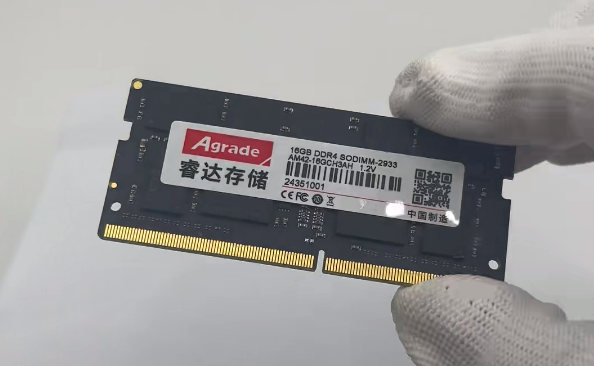
Common RAM-Related Issues in Control Systems
1. Data Corruption and ECC Errors
Data corruption is one of the most prevalent issues, often indicated by inconsistent process readings, unexpected system resets, or error messages like “ECC uncorrectable error” in system logs. Industrial grade RAM uses ECC (Error Correction Code) to fix single-bit errors and flag multi-bit errors, but persistent ECC alerts signal underlying problems. Causes include thermal stress (exceeding the module’s temperature rating), voltage fluctuations in the control system’s power supply, or degraded memory chips due to long-term use. In mission-critical control systems (e.g., power grid regulation), even occasional ECC errors can compromise process integrity, requiring immediate investigation.
2. Compatibility and Detection Failures
Control systems may fail to detect industrial RAM modules or experience intermittent connectivity issues, often stemming from compatibility mismatches. Common causes include using modules with incorrect form factors (e.g., DIMM vs. SO-DIMM), incompatible DDR generations (e.g., DDR5 in a DDR4-only PLC), or outdated motherboard firmware that cannot recognize newer RAM modules. Additionally, loose connections due to vibration—common in factory automation control panels—can cause the system to intermittently drop the RAM module, leading to crashes or unresponsive controls.
3. Overheating and Thermal Throttling
Industrial control systems are often installed in enclosed cabinets or high-temperature environments (e.g., near furnaces or manufacturing lines), leading to RAM overheating. Symptoms include reduced processing speed, frequent system freezes, or thermal shutdowns triggered by the control system’s safety protocols. Overheating accelerates memory chip degradation, shortening the RAM’s lifespan and increasing failure risk. Poor airflow in the cabinet, malfunctioning cooling fans, or dust buildup on RAM modules can exacerbate this issue.
4. Electrical Interference (EMI) and Voltage Spikes
Industrial environments are rife with electromagnetic interference (EMI) from motors, power cables, and heavy machinery, as well as voltage spikes from power grid fluctuations. EMI can disrupt RAM signal integrity, causing data transmission errors, while voltage spikes can damage RAM components. Symptoms include random system crashes, corrupted configuration files, or RAM modules failing to power on. Control systems without proper grounding or surge protection are particularly vulnerable to these issues.
5. Physical Damage and Mechanical Stress
Control systems in mobile or high-vibration settings (e.g., vehicle-mounted controllers or robotic arms) expose RAM modules to mechanical stress. Physical damage may manifest as bent pins on DIMM modules, cracked PCBs, or loose solder joints—all of which cause intermittent or permanent failures. Signs include the system failing to boot, recurring blue screens (in Windows-based controllers), or error codes indicating memory access failures.
Step-by-Step Troubleshooting Methodology
1. Gather System Data and Error Logs
Start troubleshooting by collecting critical information: review control system logs for ECC errors, temperature alerts, or memory detection failures. Use industrial-grade diagnostic tools (e.g., Siemens TIA Portal, Rockwell FactoryTalk Diagnostics) to extract RAM-related metrics, including operating temperature, voltage levels, and error counts. Note the timing of issues (e.g., after system startup, during peak workloads) and environmental conditions (e.g., temperature spikes, nearby equipment operation) to identify patterns.
2. Verify Compatibility and Connections
First, confirm the RAM module is compatible with the control system: cross-check the manufacturer’s specifications for DDR generation, form factor, capacity, and ECC support against the controller’s motherboard requirements. If compatibility is confirmed, power down the system, disconnect power sources, and inspect the RAM module and slot. Remove the module (using anti-static precautions) and check for bent pins, dust, or corrosion. Re-seat the module firmly, ensuring the retaining clips lock into place. For high-vibration environments, verify that the module is secured with industrial-grade fasteners or vibration-dampening brackets.
3. Test for Faulty Modules with Isolation and Replacement
Isolate the problematic module by testing each RAM module individually in the control system. If the system has multiple modules, remove all except one, power on the controller, and run diagnostic tests. Repeat with each module to identify the faulty unit. Alternatively, replace the suspect module with a known-good, compatible industrial RAM module—if the issue resolves, the original module is defective. For critical control systems, maintain spare modules to minimize downtime during replacement.
4. Address Environmental and Electrical Issues
If the problem persists after module replacement, investigate environmental factors: measure the operating temperature of the RAM module using thermal sensors or infrared thermometers. If temperatures exceed the module’s rated range (-40°C to 85°C for most industrial RAM), improve airflow by cleaning cooling fans, adding heat sinks, or relocating the control cabinet. For EMI-related issues, ensure the system is properly grounded, use shielded cables for power and data, and install surge protectors to mitigate voltage spikes. Check the control system’s power supply for stability—fluctuations outside the recommended voltage range (typically 12V±5%) can damage RAM modules over time.
5. Update Firmware and Diagnose Long-Term Degradation
Outdated motherboard or RAM firmware can cause compatibility issues and stability problems. Check the controller manufacturer’s website for firmware updates and apply them during planned downtime. For persistent ECC errors or performance degradation, use advanced diagnostic tools to assess RAM health: run extended memory tests (e.g., MemTest86 Industrial) to detect latent defects, or check for wear-leveling issues (for flash-based memory). If tests reveal consistent errors, replace the module—long-term degradation due to thermal cycling or electrical stress is often irreversible.
Prevention Strategies to Avoid Future RAM Issues
Proactive measures can reduce the frequency of RAM-related problems in control systems:
Regular Maintenance: Clean RAM modules and slots every 3–6 months to remove dust buildup; inspect connections and mounting hardware for signs of wear.
Environmental Monitoring: Install temperature and humidity sensors in control cabinets to alert operators to conditions outside the RAM’s operating range.
Surge and EMI Protection: Equip control systems with industrial-grade surge protectors, EMI filters, and proper grounding to shield RAM from electrical interference.
Firmware Updates: Schedule quarterly checks for motherboard and RAM firmware updates to address known issues and improve compatibility.
Quality Sourcing: Use only industrial grade RAM from reputable manufacturers (e.g., Micron, ADATA, Samsung) that meet IEC 61000 or MIL-STD-810G standards for ruggedness.
Conclusion
Industrial grade RAM is a critical component in control systems, and its reliability directly impacts operational continuity and safety. By recognizing common issues—such as data corruption, compatibility failures, overheating, and EMI interference—and following a structured troubleshooting process (gathering logs, verifying compatibility, isolating faulty modules, addressing environmental factors), engineers can resolve most RAM-related problems efficiently. Implementing proactive prevention strategies further minimizes downtime and extends the lifespan of RAM modules. In industrial control environments where unplanned outages are costly and risky, mastering RAM troubleshooting is an essential skill for maintaining system performance and ensuring the integrity of critical processes. As control systems become more integrated with AI and edge computing, the demand for reliable industrial RAM will grow—making effective troubleshooting and prevention even more vital for industrial operations.

-
Products
Advantages
-
Solutions
-
News
About us
-
Contact us
Tel:+86 19926658803
Whatsapp:+86 19926658803
lianle1210@163.com
Address: 30CF, Caihong Building, Caihong Road, Futian District, Shenzhen City, Guangdong Province, China



Friendly Links:
